One held C4 → two events
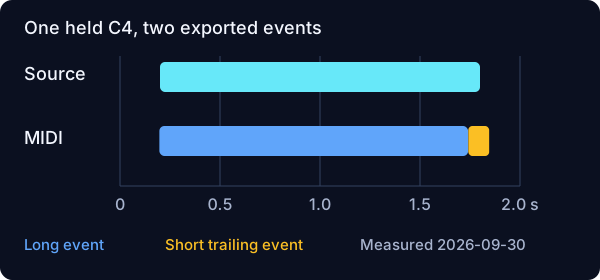
One source region produced two pitch-60 events. The first started at 0.196875 seconds and lasted 1.543750 seconds. The second started at 1.741667 seconds and lasted 0.104167 seconds. The MIDI was 108 bytes.
ORIGINAL TEST · SEPTEMBER 30, 2026
Join fragments only when the source contains one sustained note. Keep separate notes when the player strikes the same pitch again. In our controlled MP3 test, one held C4 became two MIDI notes: the event count alone cannot tell you which edit is right.
We generated four two-second mono sine-wave clips. The first held MIDI pitch 60 (C4) from 0.2 to 1.8 seconds. The next two repeated C4 with a 20-millisecond or 100-millisecond silent interval. The last changed from pitch 60 to pitch 64 (E4), with the same 100-millisecond interval. These are deliberately simple signals, not recordings of a piano or a complete song.
We encoded each WAV as a 128-kbit/s MP3, decoded it to mono audio at 22,050 Hz, and ran the installed BasicPitch 1.0.1 model on the Node CPU backend. Note extraction used onset and frame thresholds of 0.25 and a minimum length of five frames, matching this site's current note-writing pipeline. We then wrote and parsed the MIDI with @tonejs/midi 2.0.28.
This is an offline model-and-export experiment. It is not a live browser, phone, or DAW test. The native FFmpeg MP3 decode path is not a browser-compatibility claim. The downloadable files let you inspect what happened rather than relying on an accuracy score.
One source region produced two pitch-60 events. The first started at 0.196875 seconds and lasted 1.543750 seconds. The second started at 1.741667 seconds and lasted 0.104167 seconds. The MIDI was 108 bytes.
The source regions were 0.2–0.99 and 1.01–1.8 seconds. Four pitch-60 events started at 0.196875, 0.929167, 1.010417, and 1.730208 seconds. The MIDI was 125 bytes.
The source regions were 0.2–0.95 and 1.05–1.8 seconds. Four pitch-60 events started at 0.196875, 0.940625, 1.056250, and 1.741667 seconds. The MIDI was 125 bytes.
Two source regions produced two pitch-60 events and one pitch-64 event. They started at 0.196875, 0.882292, and 1.021875 seconds. The MIDI was 117 bytes. The extra event did not introduce a new pitch in this clip.
All four decoded clips contained 44,100 samples. Event counts and byte sizes above are actual outputs, not an accuracy percentage. The full timestamps and durations are in results.json.
For the held-C4 fixture, the source definition contains no second articulation. Treating its short trailing event as a new musical note would invent a performance gesture. For the two repeated-C4 fixtures, the source really does stop and restart. Joining every event at pitch 60 into one long note would erase that intended repetition.
The 100-millisecond input silence was also not reproduced as a clean equivalent MIDI gap: the second event started at 0.940625 seconds and lasted 0.115625 seconds. That observation is limited to this signal and these settings. It is a reason to compare boundaries with the original, not a rule that all gaps need a fixed correction.
Our editing recommendation, inferred from these fixtures, is to separate pitch review from articulation review. First ask whether a note is at the correct pitch. Then ask whether its start represents a real new attack. Repeated pitches are not automatically duplicates, and a plausible pitch does not prove that its boundary is correct.
Keep an unedited copy. Open the MIDI clip's note editor and select only the same-pitch fragments that belong to one held note. Use Join Notes from the Edit or context menu, or Ctrl+J on Windows / Cmd+J on Mac. Listen again against the source after the edit. These commands are documented in Ableton Live 12's MIDI editing manual, section 10.5.8.3; we did not run a DAW in this experiment.
If the source strikes the pitch again, leave a separate note at that attack. If the fragments have different pitches, do not use same-pitch joining as a substitute for checking which pitch is correct.
Download the generation and measurement script and the raw report. The report records Node v24.19.0, Windows, and the CPU backend. The script expects a site-project directory containing the listed npm dependencies and the BasicPitch model. Put the script inside that project's scripts directory, then invoke node scripts/reproduce.cjs PATH_TO_SITE_PROJECT. It writes fixtures under that project's src/evidence/note-boundaries-2026-09-30 directory. No network upload is part of the script.
The generated mono WAVs are also available: held C4, 20 ms repetition, 100 ms repetition, and C4 then E4. Compare the defined source intervals with the parsed output before making your own edits.
This small fixture set cannot establish success rates for vocals, chords, drums, complete mixes, or other instruments. Changing the model, thresholds, backend, decoder, or source envelope may change results. We have not measured those alternatives here.
Not necessarily. Our one-region held-C4 clip produced two events. Inspect the source boundaries before interpreting extra events as extra performance detail.
No. Our repeated-C4 inputs deliberately contain separate regions. Joining across their real breaks would change the source phrase.
No. It is an inspectable boundary test on four synthetic clips under one fixed pipeline, not a representative collection of music.
Import the file and load an instrument first. The DAW handoff guide covers that preceding step.