One file.
Select an audio file or a video with audio. No registration, batch queue, or saved history.
THE BROWSER WORKSPACE
One recording.
Editable note data.
Your notes appear here.
Generated from your actual conversion.Detect notes. Review the shape.
Take the result into your DAW.
Best with a clear melody or an isolated instrument. Know the limits
BRING YOUR RECORDING
This audio to MIDI workflow accepts the formats below. For video, only the audio track is decoded. Container support does not guarantee that every codec or damaged file can be read.
Browser decoding is tried first where appropriate. A locally loaded FFmpeg decoder handles the fallback. Files with no audio track cannot be transcribed.
NO DETOUR REQUIRED
Select an audio file or a video with audio. No registration, batch queue, or saved history.
Spotify Basic Pitch detects pitched note events after local decoding. The first conversion loads the model.
Inspect the piano roll, then save a Standard MIDI file. Assign an instrument and edit it in your DAW.
AN HONEST STARTING POINT
A solo instrument, prominent melody, or isolated vocal line is easier to inspect than a dense mix. This is transcription, not instrument separation.
Overlapping instruments, drums, distortion, reverb, and quiet passages can produce missed or extra notes. The preview is not an accuracy score.
Audio and model data use this tab’s memory. Long recordings take more time and may exceed a device’s resources. Phone performance varies.
The export contains one detected-note track with note timing, pitch, duration, and velocity. It does not reproduce the source instrument or guarantee pedal and pitch-bend events.
THE SHORT ANSWERS
Yes. There are no accounts, credits, or payment steps. The conversion runs on your device, using the included model and decoder.
The audio to MIDI converter accepts the input extensions listed above. WAV to MIDI uses the same tool as MP3. No separate format page or account is needed.
No. The page reads your chosen file inside the browser. Model and decoder files are loaded from this site; your audio is not sent to an external conversion service. Closing the tab clears the in-page session.
This MIDI converter exports a .mid file, not a score. Import the MIDI into a notation editor if you need sheet music, and check the detected notes before using the score.
The controls are designed for a narrow browser window. Conversion still depends on that browser’s audio decoding, model support, memory, and performance. A responsive desktop test is not a physical-phone accuracy or speed test.
FROM THE WORKBENCH
Original experiments to help you inspect and edit your MIDI. Read the results, download the controls, check the limits.

Two retained controls compare direct WAV MIDI with three serial 64 kbps MP3 generations, using parsed note fields and downloadable evidence.
Inspect the WAV-to-MIDI comparison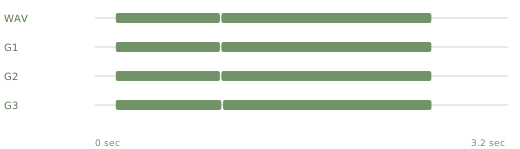
One saved WAV-to-G3 chain compares parsed MIDI events, fixed settings and capture dates in a single table.
Inspect the generation tableKEEP EXPLORING
Browse all field notes.
Actual parent hashes, decoded samples and parsed MIDI compare serial MP3 generations, with new inference separated from retained anchors.
Inspect the serial generations FIXED-SOURCE ENCODING CONTROLSNative MP3 encodings of two unchanged WAVs compare actual file sizes, parsed MIDI geometry and velocity, with old captures labelled.
Inspect the bitrate controls INDEPENDENT BOUNDARY SWITCHESFirst-only and second-only phase restarts add new matched controls, with actual MIDI intervals, conditional differences and labelled anchors.
Inspect the boundary matrix EXACT-CYCLE SOURCE CONTROLSExact-cycle and off-cycle phase pairs compare actual source bytes, captured model outputs and MIDI, with every reuse labelled.
Inspect the phase boundaries INDEPENDENT SOURCE INTERVENTIONSPhase and edge envelopes tested independently, with fresh inference distinguished from exact-input retained anchors.
Inspect the phase and envelope matrix AUTHORED AUDIO / OFFLINE CPUEight generated WAV and MP3 inputs compare authored timing with actual captured model outputs and MIDI events.
Inspect the held and repeated tones GENERATED-MIDI COUNTEREXAMPLESeven intentional repeated-note controls expose what same-pitch joining retains and removes.
Inspect the repeated-note counterexample RETAINED-MIDI EDITFive same-pitch gap cases show actual event counts, held time and original-member provenance.
Inspect fragment joining INDEPENDENT INTERVENTIONSStart-only and duration-only grid edits produce different interval geometry, with every pair recorded.
Inspect the independent edits RETAINED-MIDI EXPERIMENTFive grid cases show actual start and duration changes, with retained originals and parsed MIDI.
Inspect the grid test FIXED-OUTPUT EXPERIMENTSeven boundary cases show reference-note losses and a surviving upper event, with actual parsed MIDI.
Inspect the frequency test FIXED-OUTPUT EXPERIMENTSix tied detection thresholds show when extra pitches disappear and reference notes are lost.
Inspect the sensitivity test FIXED-OUTPUT EXPERIMENTSix minimum-length extractions of fixed model outputs. Real MIDI shows what survives and what disappears.
Inspect the length test ACTUAL BROWSER EXPORTActual browser downloads cross-checked against retained offline MIDI from identical inputs.
Inspect the export cross-check HARMONIC INPUTMatched partial controls separate higher pitches from repeated note fragments.
Read the harmonic test INPUT SIGNALSix generated controls isolate what disappears before note detection.
Read the stereo control 01 / DYNAMICSQuiet, medium and loud controls. Actual exported values, not an accuracy score.
Read the velocity test 02 / TIMINGFour downloadable MIDI files show the difference between ticks and seconds.
Read the tempo test 03 / BOUNDARIESInspect exported note boundaries before fixing the performance in your DAW.
Read the split-note testNo field notes match that search. Try a broader term.