Original export
No tempo event; parser fallback 120 BPM. Start: 156 ticks / 0.162500 seconds. Duration: 1,594 ticks / 1.660417 seconds. File: 100 bytes.
Download unchanged MIDIORIGINAL FILE EXPERIMENT · OCTOBER 3, 2026
Do not mistake a default BPM for the recording's detected beat. This converter's tested export contains no tempo event. Changing a tempo while leaving note ticks unchanged changes their timing in seconds; preserving seconds requires retiming the ticks. Decide whether you want the original performance timing or a new rhythmic speed before editing.
We reused the quiet pitch-60 control from our October 2 velocity experiment. Its audio is a generated sine tone, not a rhythmic song; it has no measured musical BPM. The existing offline MIDI is 100 bytes, with one note beginning at tick 156 and lasting 1,594 ticks. Its header uses 480 ticks per quarter note, also called PPQ.
On October 3 we parsed its raw events with midi-file and its timing with @tonejs/midi 2.0.28. The raw file contained zero Set Tempo events. The installed timing library uses 120 BPM when its tempo list is empty, producing a start of 0.1625 seconds and duration of 1.6604166666666667 seconds. That fallback is not evidence that the source was performed at 120 BPM.
We separately inspected this site's export loop. It creates a MIDI object and copies each detected note's pitch, start seconds, duration and velocity into a track. It does not estimate beats or set a tempo map. The current tool was not changed for this article; the rewritten files below are separate experimental downloads, not new converter modes.
The original MIDI was copied unchanged as the baseline. For two controls we set a tempo at tick zero while retaining the note's tick positions. For the final control we created a new file, set its tempo first, and rebuilt the note using the baseline's parsed start and duration in seconds. Every result was serialized and parsed again, rather than inferred from settings alone.
No tempo event; parser fallback 120 BPM. Start: 156 ticks / 0.162500 seconds. Duration: 1,594 ticks / 1.660417 seconds. File: 100 bytes.
Download unchanged MIDIExplicit tempo: 1,000,000 microseconds per beat. Start: 156 ticks / 0.325000 seconds. Duration: 1,594 ticks / 3.320833 seconds. File: 107 bytes.
Download same-ticks MIDISerialized tempo: 666,666 microseconds per beat. Start: 156 ticks / 0.216666 seconds. Duration: 1,594 ticks / 2.213887 seconds. File: 107 bytes.
Download 90-BPM controlExplicit tempo: 1,000,000 microseconds per beat. Start: 78 ticks / 0.162500 seconds. Duration: 797 ticks / 1.660417 seconds. File: 99 bytes.
Download retimed MIDIDisplayed seconds are rounded to six decimals. The 90-BPM request is represented by an integer tempo value in the written file; its parsed seconds therefore differ slightly from calculation with an ideal exact 90. The raw report retains that difference instead of rounding it away and claiming byte-perfect mathematical equivalence.
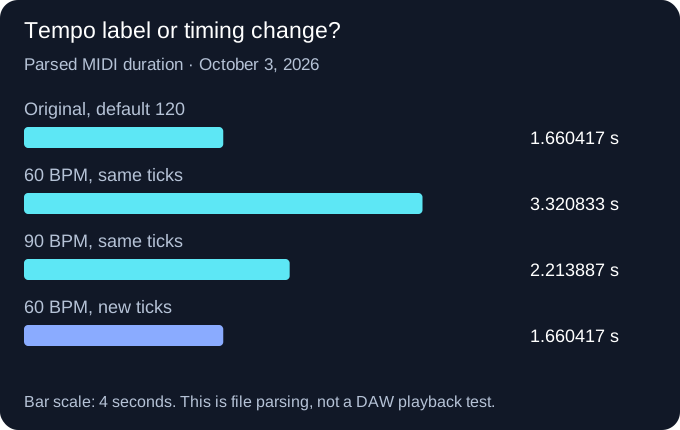
For a constant tempo starting at tick zero, our calculation is seconds = ticks / PPQ × 60 / BPM. The baseline duration is 1594 / 480 × 60 / 120 = 1.6604166666666667. Keeping those 1,594 ticks at 60 BPM gives 1594 / 480 × 60 / 60 = 3.3208333333333333. Each input comes from the parsed file or the explicitly selected experiment setting.
Preserving the baseline duration at 60 BPM instead requires ticks = seconds × BPM / 60 × PPQ. Here that is 1.6604166666666667 × 60 / 60 × 480 = 797. The observed retimed file contains 797 duration ticks and 78 start ticks, compared with 1,594 and 156 in the baseline.
Our inference is limited but useful: writing a new tempo value is not the same as stretching a performance or preserving it. The note ticks and tempo map jointly determine the seconds. This example uses one constant tempo; it does not validate a song with a changing tempo map, swing, free timing or quantization.
The Ableton step comes from its official tempo-map import guide; we did not run Live here. The parsing library's header implementation explains its tick/second conversion; the installed version was checked separately. No DAW screenshot or compatibility claim is implied.
Read the full JSON report, including the exact note values, raw tempo events, file hashes and environment. Download the reproduction script. Inside this site project with its packages and October 2 evidence installed, place it in the scripts directory and run node scripts/reproduce.cjs PATH_TO_SITE_PROJECT. The recorded environment is Node v24.19.0 on Windows.
The baseline is the same generated-source export, not a newly transcribed recording. Its SHA-256 is recorded so you can check that reuse. The other controls preserve pitch and velocity, but their metadata and lengths differ; do not describe their different bytes as transcription-quality differences.
This check does not compare competitor transcription accuracy. Tuneonmusic's inspected converter page already exposes a tempo control and describes tempo estimation; we are not claiming that every converter lacks it. The distinctive evidence here is our unchanged writer's actual empty tempo list and the four downloadable rewrites showing what ticks and seconds do.
No. The inspected writer does not perform beat estimation, and the tested original file contains no tempo event. In this check, 120 is the timing library's fallback.
Not if the same note ticks are retained. Our 60-BPM same-ticks control doubles the baseline duration. Retiming ticks is a separate operation.
No such result was demonstrated. The experiment changes a time scale; it does not correct transcription boundaries, splits or missing notes.
No. The downloadable bytes were parsed and compared in Node. Follow the receiving DAW's documentation and inspect its actual import behavior.