Quiet control
Defined peak 0.06. One pitch-60 note; exported velocity 77. MIDI size: 100 bytes.
Source MP3 · MIDI · WAV
FIELD NOTE / DYNAMICS02 OCT 2026
Do not treat this converter's exported velocity as a faithful copy of the source volume. Our quiet, medium and loud MP3 controls exported velocities of 77, 78 and 81. A changing-level phrase also split three source tones into four events. Keep the audio reference and review both the note boundaries and velocity lane after import.
Explore the controlsWe generated three original two-second mono sine-wave files at 22,050 Hz. All hold MIDI pitch 60; sound occupies 0.2–1.8 seconds. The only changed source parameter is peak amplitude: 0.06, 0.3 or 0.9, with digital full scale defined as one. Frequency is 440 × 2^((60 − 69)/12). Each tone has 220-sample edge fades and is stored as 16-bit PCM WAV, then encoded as MP3 at 128 kbit/s.
After MP3 decoding, each control contained 44,100 samples. Active-interval RMS was 0.040137, 0.200681 and 0.602050, respectively, rounded here to six decimal places. This is a measurement of sample amplitude, not perceived loudness. The calculation is sqrt(sum(samples[i]^2, i=4410..39689) / 35280); unrounded values are in the raw report.
Defined peak 0.06. One pitch-60 note; exported velocity 77. MIDI size: 100 bytes.
Source MP3 · MIDI · WAV
Defined peak 0.3. One pitch-60 note; exported velocity 78. MIDI size: 100 bytes.
Source MP3 · MIDI · WAV
Defined peak 0.9. One pitch-60 note; exported velocity 81. MIDI size: 100 bytes.
Source MP3 · MIDI · WAV
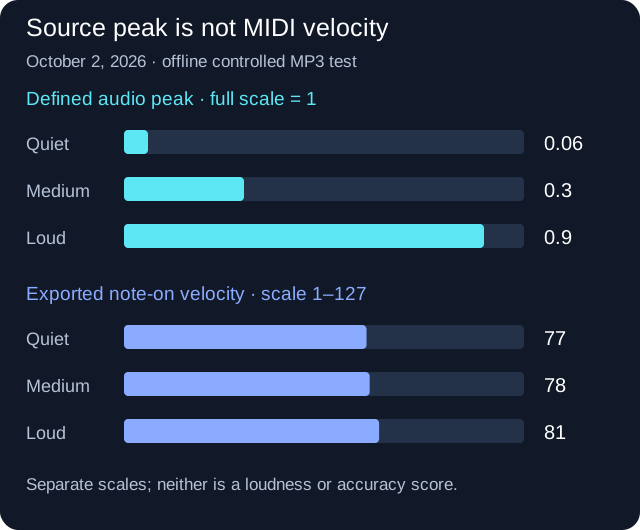
Source peak ≠ MIDI velocity
| Control | Source peak full scale = 1 | MIDI velocity 1–127 |
|---|---|---|
| Quiet | 0.06 | 77 |
| Medium | 0.3 | 78 |
| Loud | 0.9 | 81 |
Comparing separately converted files is not enough to inspect a performance's internal dynamics. We therefore generated a four-second phrase with three pitch-60 tones at 0.2–0.9, 1.3–2.0 and 2.4–3.1 seconds. Source peaks rise from 0.06 to 0.3 to 0.9. A second phrase reverses those levels while keeping the pitch, intervals, fades, encoder and conversion settings unchanged.
The rising phrase exported four notes, not three: velocities in MIDI event order were 56, 72, 85 and 75, in a 129-byte file. The last source tone was represented by two adjacent pitch-60 events, starting at approximately 2.393 and 2.532 seconds. Assigning only one velocity to that source tone would hide the split.
The falling phrase exported five pitch-60 notes and 137 bytes. Its event velocities were 83, 48, 69, 71 and 55. The first source tone had two events, and so did the second. The final tone had one event, starting at approximately 2.393 seconds. These timestamps are rounded to three decimals; the report contains the parsed starts and durations.
The quiet source therefore did not receive one fixed value across contexts: its separate long control exported 77, the first short tone in the rising phrase exported 56, and the final short tone in the falling phrase exported 55. Duration and surrounding audio differ between the long control and phrases; this is not a causal isolation of ordering alone. It is evidence against treating source amplitude as a universal lookup table for this writer.
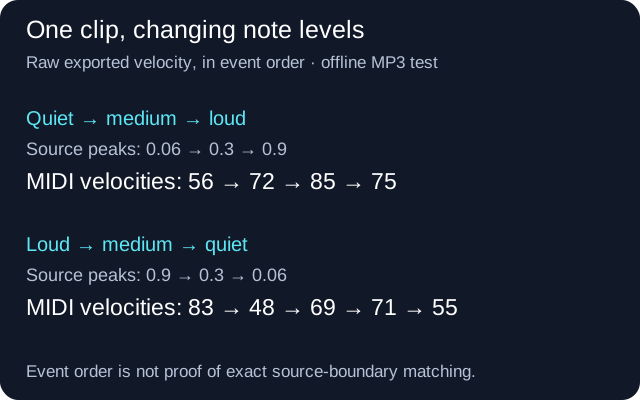
One clip. Changing levels.
Source peaks: 0.06 → 0.3 → 0.9
56 → 72 → 85 → 75Exported MIDI velocity · 4 eventsSource peaks: 0.9 → 0.3 → 0.06
83 → 48 → 69 → 71 → 55Exported MIDI velocity · 5 eventsRising phrase MP3 · WAV · MIDI
We inspected the installed BasicPitch 1.0.1 extraction code and this site's source. A note's amplitude field is calculated as the mean of the model's frame activations for that pitch over the extracted interval. It is not the RMS of the decoded audio samples. The corresponding calculation is visible in Spotify's extraction source; the installed version was checked separately for this experiment.
Our unchanged writer uses max(0.05, min(1, note.amplitude)) as the normalized MIDI velocity input. The separate controls' model-amplitude values were approximately 0.609815, 0.615932 and 0.638054, rounded to six decimals. We then parsed the written Standard MIDI bytes to obtain the actual integer values 77, 78 and 81. Those integers are measured file contents, not values guessed from a preview.
All fixtures used onset and frame thresholds of 0.25 and a minimum note length of five frames, with BasicPitch on the Node CPU backend and @tonejs/midi 2.0.28. Native FFmpeg decoded the generated MP3s. This reproduces the extraction and writing logic, but does not test Web Audio decoding or differences between browser inference backends.
The editing step is based on Ableton's MIDI editing documentation. We did not run Ableton or test a particular instrument response here. No claim is made about how many decibels any tested MIDI value would produce.
The raw JSON report records the source definitions, active-interval sample measurements, parsed MIDI events, file sizes and hashes. Download the generation and measurement script to reproduce the fixtures inside this site project with its listed packages and model installed. Place it in the project's scripts directory and run node scripts/reproduce.cjs PATH_TO_SITE_PROJECT. The recorded environment was Node v24.19.0 on Windows using the CPU backend.
This is not a first-ever test of quiet audio. On October 2 we read Note Foundry's quiet-input experiment, which already documents an energy gate and constant output velocity. Our check answers a different implementation-specific question: what this BasicPitch-based writer emits for long controls and changing-level phrases. We do not claim competitors lack experiments or that our converter is more accurate.
Only generated sine waves were used. These files do not establish dynamics accuracy for piano recordings, singers, drums, polyphonic music or full songs. They also do not tell us what a phone or DAW would do. The actionable finding is narrower: review event boundaries and velocity separately rather than assuming that a successful conversion preserved both.
Not in these controls. Source peaks of 0.06, 0.3 and 0.9 produced MIDI velocities of 77, 78 and 81. The values use different units and do not establish a proportional volume conversion.
You can edit velocities, but first inspect boundaries and intended accents. The phrase controls generated extra events; changing all their velocities would not remove those splits.
No. It describes this extraction and writer with these generated sources and settings, not every use of the library or every recording.
No. They were measured offline on the CPU backend. Testing this article's narrow layout is a separate check, not a mobile conversion test.